


Right now, you’re the one keeping track of everyone.
A reply lands from somebody you know you know. Before you can answer it, you’re scrolling up the thread to find out whether you sent them a quote or only talked about one, and what you said it would cost. The note about their daughter’s name is in your phone. The thing they said they’d ask you about in the fall is in a notebook, or it was.
You know these people. You know what you meant to do about them. What’s hard is the amount of it, and where it’s kept: a brain being used as a filing cabinet, which is the one job it’s bad at. What you need is a system outside your head that keeps the rest, and works with your brain instead of against it.

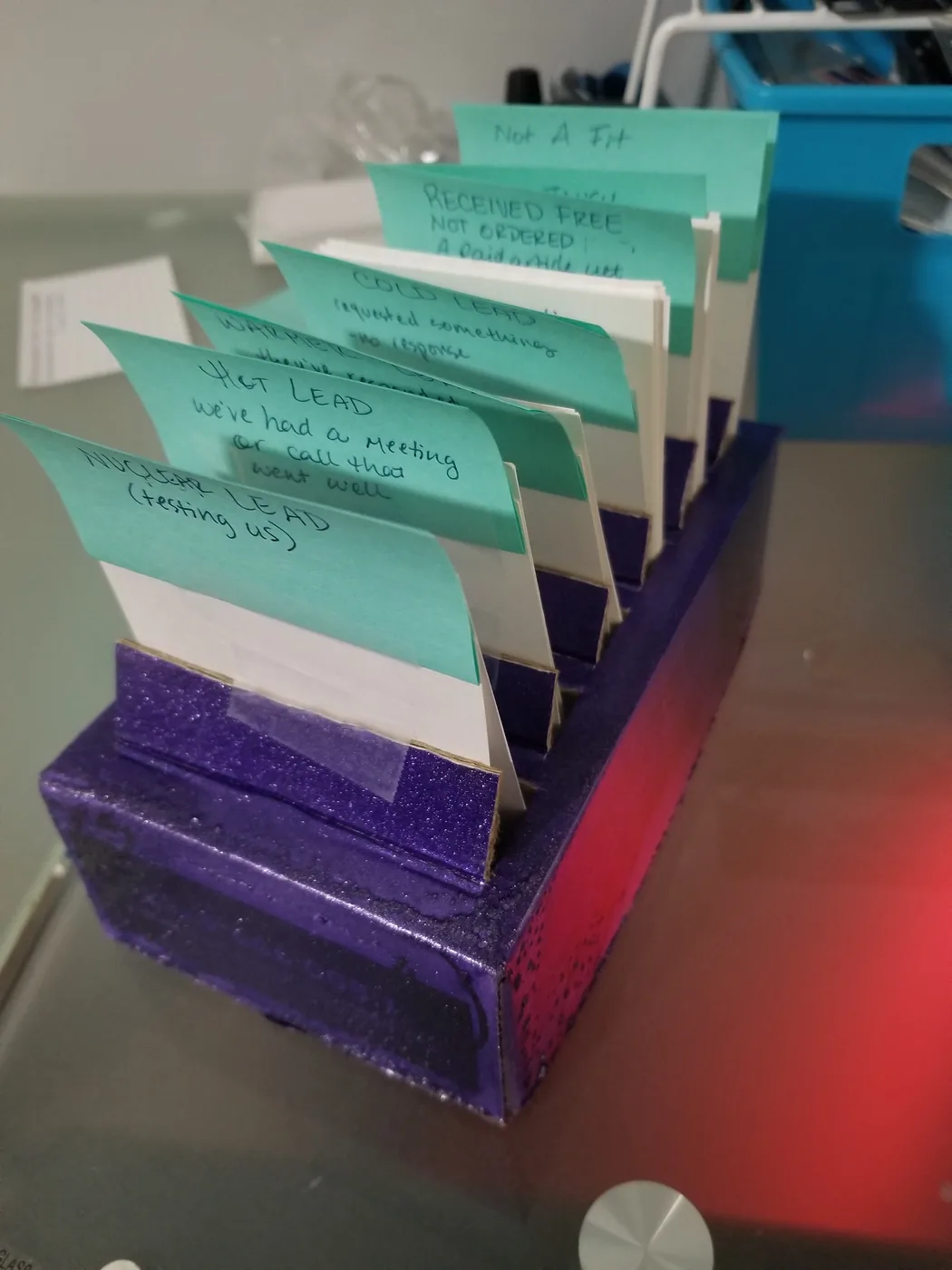
Christina built CRMs for other people. Her own was a box of index cards.
Christina, one of FableForge’s founders, was a software engineer before she was a business designer. Later she ran a HubSpot-certified partner agency, building CRMs and pipelines for clients in HubSpot, EngageBay, SharpSpring, and more.
For her own business, she lettered dividers by hand and taped up a box: Nuclear Lead (testing us). Hot Lead — we’ve had a meeting or call that went well. Cold Lead — requested something, no response.
Knowing the tech inside and out doesn’t make it easy to do for yourself. The box was the version that got built.
What she tells clients about it:
— Christina“This is okay because it let me figure out what my pipeline was for that business very quickly, and it worked, but as I grew, it wasn’t enough.”
What the CRM keeps track of for you.
You stop holding it in your head. Day to day, that looks like this.
-
Every person has a record. The notes, the tags, and the thing you said you’d do, on the person instead of in a text to yourself.
-
Lists that keep themselves up to date. You say once who belongs on a list. Whoever matches is on it, whoever stops matching drops off, and nobody rebuilds it by hand.
-
Pipelines shaped like the way you actually sell, not the way a template assumes you do.
-
The conversation hangs off the person. Open a name and what’s been said is already there, so you’re not scrolling up to find out what you agreed to. Where the messages arrive
-
You can see who’s warming up. What people do gets scored, so “who’s paying attention this week” is something you look at instead of guess at.
-
Dashboards that say where things stand, without you counting it up at the end of the month.






Add your VA, your assistant, or your whole team, and it doesn’t change your bill: no per-seat charge, and no cap on contacts either. Adding people to your account
A record can also set things going on its own — the follow-up that goes out without anybody remembering to send it. How automations work
Where each person stands with you, in eight stages.
Everybody you know sits on exactly one of these eight. It’s a framework Christina wrote and published, not something the software arrives with. You set it up, or the team does.
- Audience— free opt-ins only.
- Buyer— bought something low-touch.
- Sales Lead— actively considering a bigger offer.
- Active Client— currently in a program, or receiving services.
- Graduate— finished a structured program or service.
- Supporter— gave a testimonial, a review, or a one-off shout-out.
- Advocate— refers people consistently, more than once.
- Churned— closed out. A refund, a cancellation, an unsubscribe, or not a fit.
Not everyone becomes an Advocate, and that’s fine. Sometimes moving people along is exactly what you’re working on, and then the stages tell you where to start. Other times, the point is simply being able to look at a name and know which one they’re on.
What the CRM costs.
Your contacts and pipelines are part of the software at $127 a month. Build the first pipeline yourself, or put it in your queue and the team sets it up for you.
Questions people ask about the CRM.
I already keep all this in a spreadsheet. Is this really different?
Yes, and the difference isn’t where the names live. The spreadsheet was fine. It just can’t tell you anything you didn’t type into it, and a stage can: open somebody’s record and it says what happens next with this person, before you’ve finished reading the row.
How much do I have to set up before it’s any use?
One pipeline — the eight stages above. Everything else waits until you’ve got a reason for it, and most people never need all of it. Building the ones you don’t need yet is how a system ends up too big to use. If you’d rather not build the first one, put it in your queue and the team does it.
What about the people who don’t fit neatly anywhere?
Tags hold the parts that don’t fit, so the pipeline stays readable. Somebody sits in one stage and still carries the things about them you’d otherwise be keeping in your head — where they came from, what they canceled, what they asked you last time. Relationships aren’t tidy, and the system doesn’t ask you to pretend they are.
Is the CRM extra, or is it part of the software?
Part of it. Contacts and pipelines are in the account from day one, not an add-on you switch on later or a tier you move up to. What the price includes
Can it remind me to follow up with someone?
Yes, two ways. Put a task on their record, and it’s there the next time you open their name. Or let an automation handle it: when somebody goes quiet for as long as you’ve decided, the check-in you wrote goes out, or a task lands in front of you to get in touch yourself.
Does it connect to my calendar and my payments?
Yes. Google Calendar, Outlook, Stripe, PayPal, Zoom, and Google Meet all connect. Your contacts, your calendar, and your invoices are in the same account, so a booking or a payment belongs to the person it came from. What connects
I’m already on HighLevel with another agency. Do my contacts come with me?
Usually, yes. Your contacts and their whole history come across, along with your calendars, funnels and websites, memberships, and workflows. Your current agency starts the transfer, and we’ll tell you exactly what to ask them for. How the move works
If I stop paying for the team, do I keep my contacts?
Yes. Your contacts, their history, and the pipelines the team built stay in your account, exactly where they are. The team works inside your account, so nothing they set up lives anywhere else. What you keep

Other features that work with the CRM.
The inbox
Where the messages actually arrive.
Automations
What can fire off a contact without anyone remembering it.
Lead capture
How a stranger becomes a contact in the first place.
Invoicing
What a contact owes, and why you never retype the same details.
Christina’s full pipeline library — thirteen of them, and when to use a tag instead — is written up in the article this page is built on.